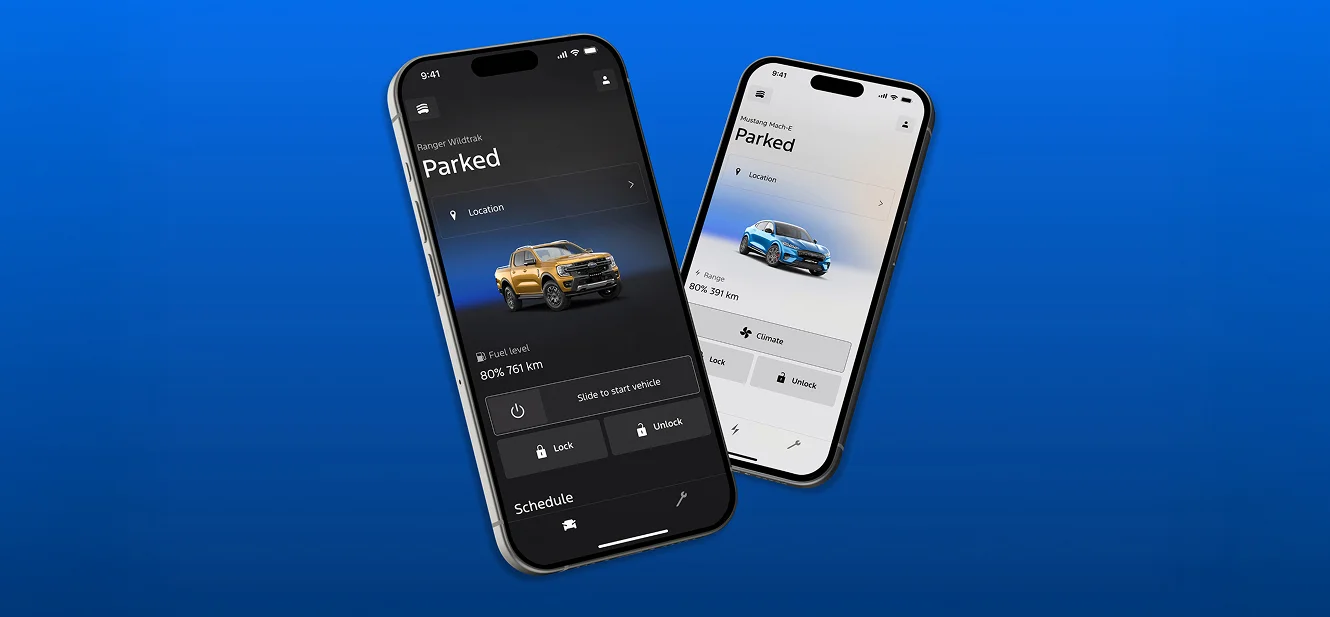
Experience a new level of convenience and control. It seamlessly connects2 you to your vehicle, transforming your smartphone into a powerful tool that enhances every journey and designed to make owning a Ford easier.



Remote start3
Remote start3
Start your vehicle from your phone and get the cabin prepped to your last climate setting. Don’t worry, once you’ve remotely started your Ford, it will remain locked.
Remote lock/unlock
Remote lock/unlock
Conveniently check to make sure your doors are locked or unlocked without being anywhere near your vehicle.
Vehicle status
Vehicle status
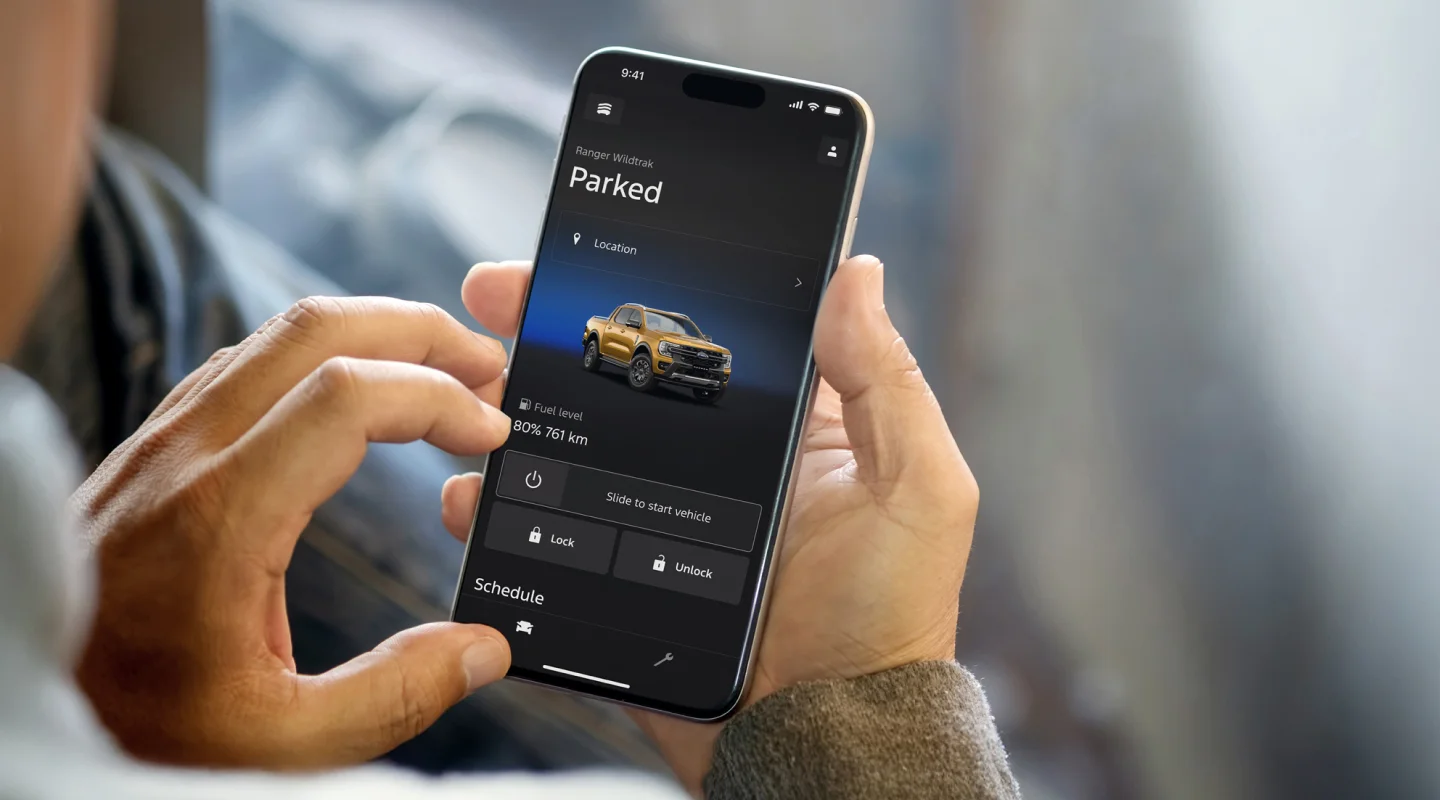
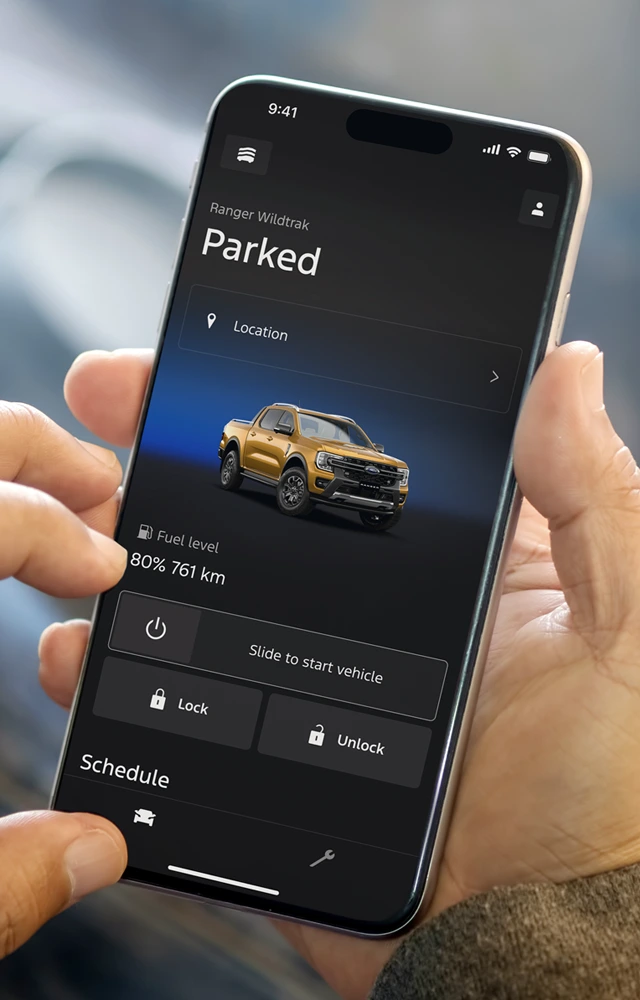
View fuel or battery level, range, tyre pressure and more, all from your phone. Perfect for planning your day before you hit the road.

Vehicle health alerts
Vehicle health alerts
Stay ahead of the little things. From low washer fluid to tailored service reminders, your Ford keeps you updated in real time with real-time vehicle health notifications.
Vehicle locator
Vehicle locator
Can’t remember where you parked? The Ford app shows your vehicle’s exact location, which is great for shared cars with the family or busy days out4.
Give access to others
You can give other users access to your vehicle from the Ford app and enjoy access to the same functionality and information as you.
What’s new in the latest version of the Ford App® App?
The Ford App has been redesigned - with a new interface, enhancements that make it easier to use, and improved responsiveness.
Key changes:
- Includes updated controls, including cabin control for EVs
- Allows users to share access to their vehicle more easily
- Includes Google Maps integration
- Is available on Apple and Android smartwatches
The Ford App has been redesigned - with a new interface, enhancements that make it easier to use, and improved responsiveness.
Key changes:
- Includes updated controls, including cabin control for EVs
- Allows users to share access to their vehicle more easily
- Includes Google Maps integration
- Is available on Apple and Android smartwatches
Which features will not be available with the new version of the Ford App?
The features listed below will not be available in the Ford App at launch, but may be re-introduced progressively:
- EV Trip Planner
- Trailer Checklist (for select vehicles)
- Zone Lighting (for select vehicles)
- How to Videos
- Warranty Information
- Owner’s Manual
Can I still plan a trip for my Electric Vehicle?
EV Trip Planner is currently unavailable in the Ford App, but may be introduced at a later time. You can still plan your trip using your in-vehicle touch screen (SYNC).
Can I still light up zones around my vehicle?
Zone Lighting is currently unavailable in the Ford App, but may be introduced at a later time. You can still access Zone Lighting using your in-vehicle touch screen (SYNC) where equipped.
Where can I find my vehicle Owner Manual?
A digital version of your Owner Manual can be found by visiting ford.co.nz/owners/owner-manual and entering your vehicle information.
Depending on your vehicle model and year, it may also be available through your in-vehicle touchscreen (SYNC).
A digital version of your Owner Manual can be found by visiting ford.co.nz/owners/owner-manual and entering your vehicle information.
Depending on your vehicle model and year, it may also be available through your in-vehicle touchscreen (SYNC).
How do I manage vehicle access requests in the newly redesigned Ford App?
If your Ford vehicle is already connected in the newly redesigned Ford App, you’ll be able to find and manage any new vehicle user access requests by selecting your vehicle in the app, then selecting “Vehicle Details”. From there, you can approve or deny any new user access requests.
Where can I find the new Ford App?
If you’re already using the Ford App, and have automatic updates enabled, it will update when the new version launches. You can also visit the Apple App Store or Google Play Store to check for an available update.
What is the Ford App?
The Ford App is a mobile application that allows Ford owners to connect with their vehicle, access vehicle information, and use connectivity features for an enhanced ownership experience.
What can I do with the Ford App?
Features include remote start, remote lock and unlock, vehicle status checks (like fuel level and tyre pressure), vehicle location and locating a Ford Dealer.
How do I download the Ford App?
Which devices are compatible with the Ford App?
The Ford App is compatible with smartphones and smartwatches with the following operating systems and versions:
- iOS® software requirements: software version 17.0 or later.
- AndroidTM software requirements: software version 10.0 or later.
How do I connect my vehicle to the Ford App?
After downloading the app and creating an account, follow the prompts in the app to add your vehicle. You will need to scan or enter your VIN (Vehicle Identification Number) and ensure your vehicle is compatible.
Who can I contact for support on the Ford App?
You can call or email Guides through the Ford App.
Contact details are also provided below:
- Phone: 0800 367 369
- Email: nzinfo@ford.com
You can call or email Guides through the Ford App.
Contact details are also provided below:
- Phone: 0800 367 369
- Email: nzinfo@ford.com
- What’s new in the latest version of the Ford App® App?
- Which features will not be available with the new version of the Ford App?
- Can I still plan a trip for my Electric Vehicle?
- Can I still light up zones around my vehicle?
- Where can I find my vehicle Owner Manual?
- How do I manage vehicle access requests in the newly redesigned Ford App?
- Where can I find oil life, tyre pressure, and odometer in the new Ford App?
- Where can I find the new Ford App?
- What is the Ford App?
- What can I do with the Ford App?
- How do I download the Ford App?
- Which devices are compatible with the Ford App?
- Is the Ford App free?
- Do I need to create an account to use the Ford App?
- How do I connect my vehicle to the Ford App?
- What if I forget my Ford App password?
- How can I provide feedback about the Ford App?
- Who can I contact for support on the Ford App?
The Ford App has been redesigned - with a new interface, enhancements that make it easier to use, and improved responsiveness.
Key changes:
- Includes updated controls, including cabin control for EVs
- Allows users to share access to their vehicle more easily
- Includes Google Maps integration
- Is available on Apple and Android smartwatches
The Ford App has been redesigned - with a new interface, enhancements that make it easier to use, and improved responsiveness.
Key changes:
- Includes updated controls, including cabin control for EVs
- Allows users to share access to their vehicle more easily
- Includes Google Maps integration
- Is available on Apple and Android smartwatches
The features listed below will not be available in the Ford App at launch, but may be re-introduced progressively:
- EV Trip Planner
- Trailer Checklist (for select vehicles)
- Zone Lighting (for select vehicles)
- How to Videos
- Warranty Information
- Owner’s Manual
EV Trip Planner is currently unavailable in the Ford App, but may be introduced at a later time. You can still plan your trip using your in-vehicle touch screen (SYNC).
Zone Lighting is currently unavailable in the Ford App, but may be introduced at a later time. You can still access Zone Lighting using your in-vehicle touch screen (SYNC) where equipped.
A digital version of your Owner Manual can be found by visiting ford.co.nz/owners/owner-manual and entering your vehicle information.
Depending on your vehicle model and year, it may also be available through your in-vehicle touchscreen (SYNC).
A digital version of your Owner Manual can be found by visiting ford.co.nz/owners/owner-manual and entering your vehicle information.
Depending on your vehicle model and year, it may also be available through your in-vehicle touchscreen (SYNC).
If your Ford vehicle is already connected in the newly redesigned Ford App, you’ll be able to find and manage any new vehicle user access requests by selecting your vehicle in the app, then selecting “Vehicle Details”. From there, you can approve or deny any new user access requests.
If you’re already using the Ford App, and have automatic updates enabled, it will update when the new version launches. You can also visit the Apple App Store or Google Play Store to check for an available update.
The Ford App is a mobile application that allows Ford owners to connect with their vehicle, access vehicle information, and use connectivity features for an enhanced ownership experience.
Features include remote start, remote lock and unlock, vehicle status checks (like fuel level and tyre pressure), vehicle location and locating a Ford Dealer.
The Ford App is compatible with smartphones and smartwatches with the following operating systems and versions:
- iOS® software requirements: software version 17.0 or later.
- AndroidTM software requirements: software version 10.0 or later.
After downloading the app and creating an account, follow the prompts in the app to add your vehicle. You will need to scan or enter your VIN (Vehicle Identification Number) and ensure your vehicle is compatible.
You can call or email Guides through the Ford App.
Contact details are also provided below:
- Phone: 0800 367 369
- Email: nzinfo@ford.com
You can call or email Guides through the Ford App.
Contact details are also provided below:
- Phone: 0800 367 369
- Email: nzinfo@ford.com
Disclosures
We are working on always improving the Ford app and user experience. To achieve this, Ford may make changes to features, including adding, removing, or modifying existing ones.
Use of Ford app is subject to the Ford app Terms and User Guide and Ford app Privacy Collection Notice, which are available on https://www.ford.com.nz/privacy and requires a compatible mobile device, internet access and software (including software updates from time to time). The Ford app functionality and appearance may change over time due to software updates. You are responsible for internet access, mobile network data and voice call services required for your use of the Ford app on your mobile device, including associated fees. The Ford app and the Vehicle's Modem can only work when both are connected to the telecommunications network. The Vehicle's Modem will only function on the telecommunications networks it could use at time of manufacture. When all compatible networks for the modem in your vehicle are no longer available, the modem will stop functioning and the connected services and all data transmission via the modem will cease. Ford cannot guarantee that the Ford app will be in fully operating condition at all times and the Ford app may be unavailable or particular Ford app services interrupted. If the Ford app is unavailable, the ability to lock or unlock your vehicle remotely could be limited, and a physical key might be needed. Always keep your key with you to ensure you can access your vehicle at all times even if the Ford app is unavailable. Ford is not responsible for any limitations or restrictions of the telecommunications network or of your mobile device. Warning: Local laws prohibit some phone functions while driving. Check your local road rules before using these functions. Use Remote Vehicle Start and Stop responsibly and only in well ventilated areas where you are aware of your vehicle's surroundings.
Available on vehicles fitted with Ford Connect Embedded Modem.
Remote Start & Stop only available on automatic vehicles. Use responsibly and only in well-ventilated areas where you are aware of your vehicle’s surroundings.
Vehicle Location settings must be switched on.
We are working on always improving the Ford app and user experience. To achieve this, Ford may make changes to features, including adding, removing, or modifying existing ones.
Use of Ford app is subject to the Ford app Terms and User Guide and Ford app Privacy Collection Notice, which are available on https://www.ford.com.nz/privacy and requires a compatible mobile device, internet access and software (including software updates from time to time). The Ford app functionality and appearance may change over time due to software updates. You are responsible for internet access, mobile network data and voice call services required for your use of the Ford app on your mobile device, including associated fees. The Ford app and the Vehicle's Modem can only work when both are connected to the telecommunications network. The Vehicle's Modem will only function on the telecommunications networks it could use at time of manufacture. When all compatible networks for the modem in your vehicle are no longer available, the modem will stop functioning and the connected services and all data transmission via the modem will cease. Ford cannot guarantee that the Ford app will be in fully operating condition at all times and the Ford app may be unavailable or particular Ford app services interrupted. If the Ford app is unavailable, the ability to lock or unlock your vehicle remotely could be limited, and a physical key might be needed. Always keep your key with you to ensure you can access your vehicle at all times even if the Ford app is unavailable. Ford is not responsible for any limitations or restrictions of the telecommunications network or of your mobile device. Warning: Local laws prohibit some phone functions while driving. Check your local road rules before using these functions. Use Remote Vehicle Start and Stop responsibly and only in well ventilated areas where you are aware of your vehicle's surroundings.
Available on vehicles fitted with Ford Connect Embedded Modem.
Remote Start & Stop only available on automatic vehicles. Use responsibly and only in well-ventilated areas where you are aware of your vehicle’s surroundings.
Vehicle Location settings must be switched on.
- Disclosures
We are working on always improving the Ford app and user experience. To achieve this, Ford may make changes to features, including adding, removing, or modifying existing ones.
Use of Ford app is subject to the Ford app Terms and User Guide and Ford app Privacy Collection Notice, which are available on https://www.ford.com.nz/privacy and requires a compatible mobile device, internet access and software (including software updates from time to time). The Ford app functionality and appearance may change over time due to software updates. You are responsible for internet access, mobile network data and voice call services required for your use of the Ford app on your mobile device, including associated fees. The Ford app and the Vehicle's Modem can only work when both are connected to the telecommunications network. The Vehicle's Modem will only function on the telecommunications networks it could use at time of manufacture. When all compatible networks for the modem in your vehicle are no longer available, the modem will stop functioning and the connected services and all data transmission via the modem will cease. Ford cannot guarantee that the Ford app will be in fully operating condition at all times and the Ford app may be unavailable or particular Ford app services interrupted. If the Ford app is unavailable, the ability to lock or unlock your vehicle remotely could be limited, and a physical key might be needed. Always keep your key with you to ensure you can access your vehicle at all times even if the Ford app is unavailable. Ford is not responsible for any limitations or restrictions of the telecommunications network or of your mobile device. Warning: Local laws prohibit some phone functions while driving. Check your local road rules before using these functions. Use Remote Vehicle Start and Stop responsibly and only in well ventilated areas where you are aware of your vehicle's surroundings.
Available on vehicles fitted with Ford Connect Embedded Modem.
Remote Start & Stop only available on automatic vehicles. Use responsibly and only in well-ventilated areas where you are aware of your vehicle’s surroundings.
Vehicle Location settings must be switched on.
We are working on always improving the Ford app and user experience. To achieve this, Ford may make changes to features, including adding, removing, or modifying existing ones.
Use of Ford app is subject to the Ford app Terms and User Guide and Ford app Privacy Collection Notice, which are available on https://www.ford.com.nz/privacy and requires a compatible mobile device, internet access and software (including software updates from time to time). The Ford app functionality and appearance may change over time due to software updates. You are responsible for internet access, mobile network data and voice call services required for your use of the Ford app on your mobile device, including associated fees. The Ford app and the Vehicle's Modem can only work when both are connected to the telecommunications network. The Vehicle's Modem will only function on the telecommunications networks it could use at time of manufacture. When all compatible networks for the modem in your vehicle are no longer available, the modem will stop functioning and the connected services and all data transmission via the modem will cease. Ford cannot guarantee that the Ford app will be in fully operating condition at all times and the Ford app may be unavailable or particular Ford app services interrupted. If the Ford app is unavailable, the ability to lock or unlock your vehicle remotely could be limited, and a physical key might be needed. Always keep your key with you to ensure you can access your vehicle at all times even if the Ford app is unavailable. Ford is not responsible for any limitations or restrictions of the telecommunications network or of your mobile device. Warning: Local laws prohibit some phone functions while driving. Check your local road rules before using these functions. Use Remote Vehicle Start and Stop responsibly and only in well ventilated areas where you are aware of your vehicle's surroundings.
Available on vehicles fitted with Ford Connect Embedded Modem.
Remote Start & Stop only available on automatic vehicles. Use responsibly and only in well-ventilated areas where you are aware of your vehicle’s surroundings.
Vehicle Location settings must be switched on.